Raspberry Pi 4 Model B 2GB reduced to clear.
We are clearing our remaining Raspberry Pi 4B stock at a reduced price. These are genuine, new, boxed boards. Stock is limited and will not be replenished.
Pair it with the SONOFF Zigbee Dongle-Max for a complete Home Assistant Zigbee hub.
🖥️ Raspberry Pi 4 Model B — 2GB RAM | Home Assistant & Smart Home Server
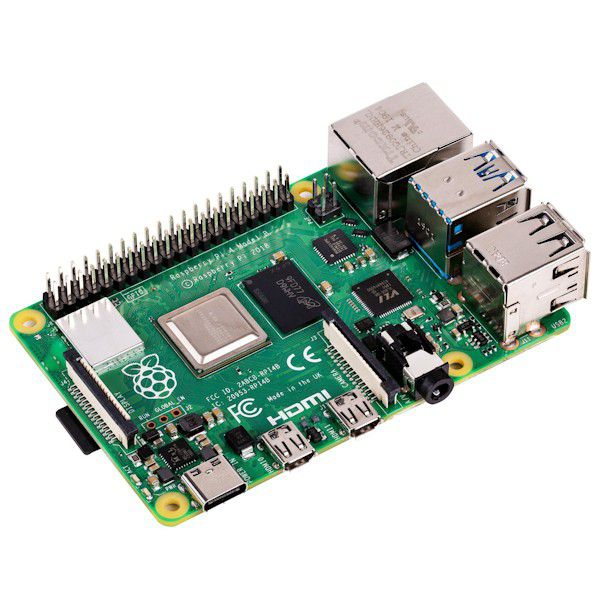
The recommended single-board computer for Home Assistant. The Raspberry Pi 4 Model B brings a 1.5 GHz quad-core ARM Cortex-A72, 2GB LPDDR4 RAM, USB 3.0, Gigabit Ethernet, dual micro-HDMI, and USB-C power. Significantly faster than the Pi 3B — handles larger smart home setups, multiple dashboards, camera streams, and heavier add-ons. Pair with a ZBDongle-E or Dongle-LMG21 for full local Zigbee control.
Choose your Raspberry Pi:
⚡ Key Features
- 1.5 GHz Quad-Core ARM Cortex-A72 — 64-bit Broadcom BCM2711 SoC; ~3× faster than Pi 3B for Home Assistant, dashboards, and add-ons
- 2GB LPDDR4 RAM — enough for Home Assistant with multiple integrations and moderate add-on usage
- USB 3.0 (2 ports) + USB 2.0 (2 ports) — faster data transfer for Zigbee dongles and SSD boot
- True Gigabit Ethernet — full-speed wired networking; no more shared USB bus bottleneck
- Built-In WiFi & Bluetooth 5.0 — 802.11ac dual-band (2.4/5 GHz) WiFi and BLE
- Dual Micro-HDMI — supports dual 4K displays (4Kp60 + 4Kp30)
- 40-Pin GPIO Header — same pinout as Pi 3B; compatible with all HATs and accessories
- MicroSD + USB Boot — boot from MicroSD or USB SSD for faster, more reliable operation
- USB-C Power — 5V / 3A USB-C power supply recommended (not included)
🏠 Perfect For
Home Assistant (Recommended)
The Pi 4B is the recommended platform for Home Assistant. Faster CPU, more RAM, and USB 3.0 mean smoother dashboards, quicker automations, and room for add-ons like Grafana, Node-RED, and ESPHome.
Zigbee2MQTT + Matter
USB 3.0 ports for Zigbee dongles. Run Zigbee2MQTT or ZHA alongside Thread/Matter for next-gen device support. The faster CPU handles large Zigbee networks without lag.
Camera & NVR Server
Stream and record from SONOFF cameras via Frigate or MotionEye. The Pi 4B's Gigabit Ethernet and USB 3.0 handle video processing that the Pi 3B struggles with.
SSD Boot for Reliability
Boot from a USB SSD instead of a MicroSD card. USB 3.0 gives fast read/write speeds and eliminates SD card corruption — the #1 cause of Pi failures.
📋 Technical Specifications
| Product | Raspberry Pi 4 Model B |
| SoC | Broadcom BCM2711 (64-bit) |
| CPU | 1.5 GHz Quad-Core ARM Cortex-A72 |
| RAM | 2GB LPDDR4-3200 |
| WiFi | 802.11ac Dual-Band (2.4/5 GHz) |
| Bluetooth | Bluetooth 5.0 / BLE |
| Ethernet | True Gigabit (1000 Mbps) |
| USB | 2× USB 3.0 + 2× USB 2.0 |
| Video | 2× Micro-HDMI (4K supported) |
| GPIO | 40-pin header |
| Storage | MicroSD slot + USB boot support |
| Power | USB-C · 5V / 3A recommended |
| Dimensions | 85.6 × 56.5 × 17 mm |
| In the Box | 1× Raspberry Pi 4 Model B board |
❓ Frequently Asked Questions
Is 2GB RAM enough for Home Assistant?
What power supply do I need?
Should I boot from SD card or SSD?
Can I use my Pi 3B accessories?
🤝 Need Help? We're Here for You!
Visit Us
8 Wildebraam Street
Weltevreden Park, Roodepoort
Gauteng, 1709
The Smart Home Brain. Upgraded.
Raspberry Pi 4B — faster CPU, USB 3.0, Gigabit Ethernet. Built for Home Assistant.