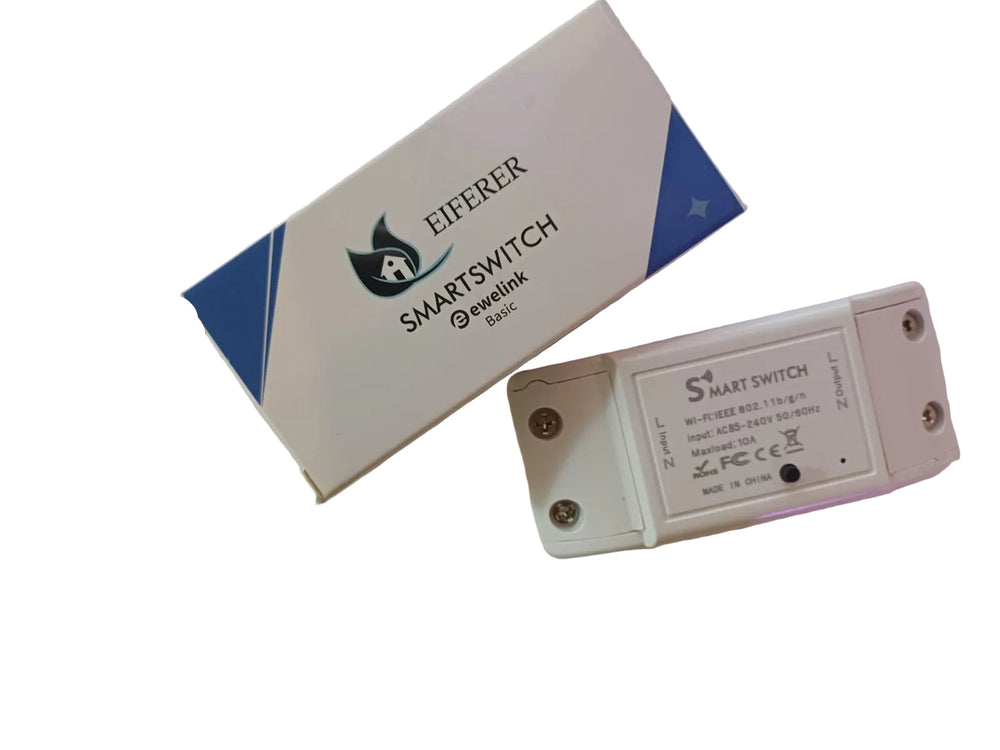


⚡ EIFERER eWeLink Basic — WiFi Smart Relay Switch
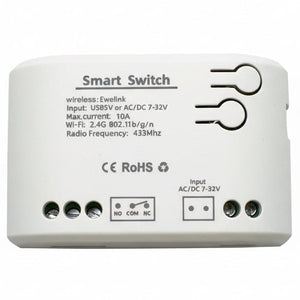
The simplest way to make any appliance smart. This compact WiFi relay switch installs inline behind lights, fans, pumps, or any appliance up to 10A. Control from anywhere with the free eWeLink app. Schedule timers, set countdowns, create smart scenes, and use voice control with Amazon Alexa and Google Home. No hub required — just WiFi.
⚡ Key Features
- WiFi Smart Switch — connects directly to your 2.4 GHz WiFi router, no hub or bridge needed
- eWeLink App Control — free iOS and Android app for remote on/off from anywhere in the world
- Scheduling & Timers — countdown timers, scheduled on/off, and loop timers to automate your routine
- Smart Scenes — trigger actions automatically based on time, other devices, or sensor input via eWeLink
- Voice Control — works with Amazon Alexa and Google Home / Google Assistant for hands-free control
- 10A / 2,200W Max Load — handles lights, fans, pumps, heaters, and most household appliances at SA 220V
- 100-240V AC Input — universal voltage, fully compatible with South African 220-240V mains
- Compact Inline Design — small enough to fit inside a wall box, ceiling rose, or DB board enclosure
- LAN Control — control locally when your internet is down, as long as the device and phone are on the same WiFi network
- Device Sharing — share control with family members via the eWeLink app
💡 What Can You Automate?
Lights
Install behind any light switch or inside a ceiling rose to add remote control, scheduling, and voice control to existing lights.
Fans & Extractors
Automate bathroom extractors, ceiling fans, or kitchen extractors with timers and smart scenes.
Geysers (with Contactor)
Use with a contactor to control geysers remotely. For geysers up to 3 kW, see the POW R320 Elite instead.
Irrigation & Pumps
Set watering schedules for your garden. Turn pool pumps on and off automatically based on a daily timer.
🔧 How It Works
Simple Inline Installation
The eWeLink Basic is a relay switch — it wires inline between your power source and your appliance. Connect Live In, Neutral, and Live Out. Once powered, it creates a WiFi connection to your router and appears in the eWeLink app. From there, you can control it remotely, set schedules, and add it to smart scenes. Installation should be done by a qualified electrician.
📦 Feature Highlights
eWeLink App
Free app for iOS and Android. Remote on/off, scheduling, countdown timers, smart scenes, device sharing, and real-time status from anywhere.
Voice Control
Works with Amazon Alexa and Google Home. "Alexa, turn off the pool pump" — it's that simple.
Timers & Schedules
Set daily/weekly schedules, single or recurring timers, countdown auto-off, and loop timers. Up to 8 timers per device.
Smart Scenes
Create if-then automations between eWeLink devices. Trigger lights based on sensors, link switches together, or build whole-home routines.
🔗 Perfect Companions
SONOFF NSPanel Pro 120
4.7″ touchscreen control panel. Create smart scenes that include your eWeLink Basic switches alongside Zigbee sensors and other devices.
View Product →SONOFF T5 TX Ultimate
Premium smart wall switch with full-surface touch, LED edge lighting, and eWeLink-Remote. For rooms where you want a visible upgrade.
View Product →SONOFF T6 TX Gen2
Touch wall switch with Matter protocol and Apple Home support. A visible smart switch alternative to the hidden relay approach.
View Product →SONOFF M5 SwitchMan
Physical button wall switch with Matter. NRCS & ICASA certified. For rooms where you prefer a click-button smart switch on the wall.
View Product →📋 Technical Specifications
| Product | EIFERER eWeLink Basic |
| Type | WiFi Smart Relay Switch (1 channel, inline) |
| Input Voltage | 100-240V AC 50/60Hz (SA 220-240V compatible) |
| Max Load | 10A / 2,200W @ 220V |
| WiFi | IEEE 802.11 b/g/n 2.4 GHz |
| Hub Required | No — connects directly to WiFi router |
| App | eWeLink (iOS & Android) |
| Voice Control | Amazon Alexa · Google Home / Assistant |
| LAN Control | Yes — local control when internet is down |
| Smart Scenes | Yes — eWeLink if-then automations |
| Timers | Schedule, countdown, loop (up to 8 per device) |
| Device Sharing | Yes — share with family via eWeLink app |
| Casing Material | ABS flame-retardant plastic |
| Certifications | CE · FCC |
| Warranty | 1 Year Manufacturer Warranty |
❓ Frequently Asked Questions
Do I need a hub or bridge?
Can I still use my existing wall switch?
What can I control with it?
Does it work with 5 GHz WiFi?
Does it work during load shedding?
Can I use it for a geyser?
Is it safe?
Can multiple people control it?
🤝 Need Help? We're Here for You!
Visit Us
8 Wildebraam Street
Weltevreden Park, Roodepoort
Gauteng, 1709
Make Any Appliance Smart.
WiFi Control · eWeLink App · Voice Control · Schedules & Timers · No Hub Required